ShopDreamUp AI ArtDreamUp
Deviation Actions


Suggested Deviants


Suggested Collections
![Purple Paint [Custom Background for DA]](https://images-wixmp-ed30a86b8c4ca887773594c2.wixmp.com/f/08800aef-a1c3-4ac3-be7e-032bd085f169/d6a4dwn-b0f0dcd2-cc4c-463f-b867-0fbdf432b75c.png/v1/crop/w_184,h_184,x_0,y_502,scl_0.27380952380952,q_70,strp/purple_paint__custom_background_for_da__by_darkdissolution_d6a4dwn-92s-2x.jpg?token=eyJ0eXAiOiJKV1QiLCJhbGciOiJIUzI1NiJ9.eyJzdWIiOiJ1cm46YXBwOjdlMGQxODg5ODIyNjQzNzNhNWYwZDQxNWVhMGQyNmUwIiwiaXNzIjoidXJuOmFwcDo3ZTBkMTg4OTgyMjY0MzczYTVmMGQ0MTVlYTBkMjZlMCIsIm9iaiI6W1t7ImhlaWdodCI6Ijw9ODAwMCIsInBhdGgiOiJcL2ZcLzA4ODAwYWVmLWExYzMtNGFjMy1iZTdlLTAzMmJkMDg1ZjE2OVwvZDZhNGR3bi1iMGYwZGNkMi1jYzRjLTQ2M2YtYjg2Ny0wZmJkZjQzMmI3NWMucG5nIiwid2lkdGgiOiI8PTY3MiJ9XV0sImF1ZCI6WyJ1cm46c2VydmljZTppbWFnZS5vcGVyYXRpb25zIl19.YKYgUyOc1bt8viH4uG_YrkWPaqgfk8pz0PvEPYzSp5Q)
![Purple Paint [Custom Background for DA]](https://images-wixmp-ed30a86b8c4ca887773594c2.wixmp.com/f/08800aef-a1c3-4ac3-be7e-032bd085f169/d6a4dwn-b0f0dcd2-cc4c-463f-b867-0fbdf432b75c.png/v1/crop/w_92,h_92,x_0,y_251,scl_0.13690476190476,q_70,strp/purple_paint__custom_background_for_da__by_darkdissolution_d6a4dwn-92s.jpg?token=eyJ0eXAiOiJKV1QiLCJhbGciOiJIUzI1NiJ9.eyJzdWIiOiJ1cm46YXBwOjdlMGQxODg5ODIyNjQzNzNhNWYwZDQxNWVhMGQyNmUwIiwiaXNzIjoidXJuOmFwcDo3ZTBkMTg4OTgyMjY0MzczYTVmMGQ0MTVlYTBkMjZlMCIsIm9iaiI6W1t7ImhlaWdodCI6Ijw9ODAwMCIsInBhdGgiOiJcL2ZcLzA4ODAwYWVmLWExYzMtNGFjMy1iZTdlLTAzMmJkMDg1ZjE2OVwvZDZhNGR3bi1iMGYwZGNkMi1jYzRjLTQ2M2YtYjg2Ny0wZmJkZjQzMmI3NWMucG5nIiwid2lkdGgiOiI8PTY3MiJ9XV0sImF1ZCI6WyJ1cm46c2VydmljZTppbWFnZS5vcGVyYXRpb25zIl19.YKYgUyOc1bt8viH4uG_YrkWPaqgfk8pz0PvEPYzSp5Q)
![Red Paint [Custom DA Background FREE TO USE]](https://images-wixmp-ed30a86b8c4ca887773594c2.wixmp.com/f/08800aef-a1c3-4ac3-be7e-032bd085f169/d68gx4o-ca1cb121-821f-4500-bfb8-1190305fbd92.png/v1/crop/w_184,h_184,x_0,y_502,scl_0.27380952380952,q_70,strp/red_paint__custom_da_background_free_to_use__by_darkdissolution_d68gx4o-92s-2x.jpg?token=eyJ0eXAiOiJKV1QiLCJhbGciOiJIUzI1NiJ9.eyJzdWIiOiJ1cm46YXBwOjdlMGQxODg5ODIyNjQzNzNhNWYwZDQxNWVhMGQyNmUwIiwiaXNzIjoidXJuOmFwcDo3ZTBkMTg4OTgyMjY0MzczYTVmMGQ0MTVlYTBkMjZlMCIsIm9iaiI6W1t7ImhlaWdodCI6Ijw9ODAwMCIsInBhdGgiOiJcL2ZcLzA4ODAwYWVmLWExYzMtNGFjMy1iZTdlLTAzMmJkMDg1ZjE2OVwvZDY4Z3g0by1jYTFjYjEyMS04MjFmLTQ1MDAtYmZiOC0xMTkwMzA1ZmJkOTIucG5nIiwid2lkdGgiOiI8PTY3MiJ9XV0sImF1ZCI6WyJ1cm46c2VydmljZTppbWFnZS5vcGVyYXRpb25zIl19.joasxkFnKOH3j8B4L92mcZ9AM9c_oLr2ypweu3ZtzdY)
![Red Paint [Custom DA Background FREE TO USE]](https://images-wixmp-ed30a86b8c4ca887773594c2.wixmp.com/f/08800aef-a1c3-4ac3-be7e-032bd085f169/d68gx4o-ca1cb121-821f-4500-bfb8-1190305fbd92.png/v1/crop/w_92,h_92,x_0,y_251,scl_0.13690476190476,q_70,strp/red_paint__custom_da_background_free_to_use__by_darkdissolution_d68gx4o-92s.jpg?token=eyJ0eXAiOiJKV1QiLCJhbGciOiJIUzI1NiJ9.eyJzdWIiOiJ1cm46YXBwOjdlMGQxODg5ODIyNjQzNzNhNWYwZDQxNWVhMGQyNmUwIiwiaXNzIjoidXJuOmFwcDo3ZTBkMTg4OTgyMjY0MzczYTVmMGQ0MTVlYTBkMjZlMCIsIm9iaiI6W1t7ImhlaWdodCI6Ijw9ODAwMCIsInBhdGgiOiJcL2ZcLzA4ODAwYWVmLWExYzMtNGFjMy1iZTdlLTAzMmJkMDg1ZjE2OVwvZDY4Z3g0by1jYTFjYjEyMS04MjFmLTQ1MDAtYmZiOC0xMTkwMzA1ZmJkOTIucG5nIiwid2lkdGgiOiI8PTY3MiJ9XV0sImF1ZCI6WyJ1cm46c2VydmljZTppbWFnZS5vcGVyYXRpb25zIl19.joasxkFnKOH3j8B4L92mcZ9AM9c_oLr2ypweu3ZtzdY)


You Might Like…



Description
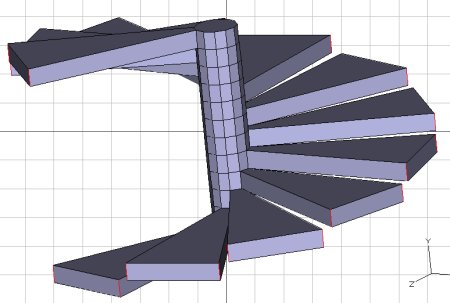
In this tutorial, I will show you how to create a simple spiral staircase as shown above using my favorite 3D program, Art of Illusion a.k.a. "AoI" (a free, java-based open source tool). You can download it here: [link]
This tutorial will require the use of the Polymesh Editor Plugin (PME). If you're not familiar with downloading/installing scripts/plugins for AoI, check out these video tutorials by marcc ([link]). The process is really straightforward.
I don't cover the texturing/rendering aspects, but you can check out some rendering tips in one of my other tutorials here: [link] or downloading the manual here (I highly recommend it!): [link]
If you're familiar with my other tutorials, you know what to expect: I'll walk you step-by-step through the entire process. A 3D newb, such as myself, should be able to work through the entire project with as little pain as possible.
However, if you do find someplace where I've not been clear enough or maybe you need a little bit of additional explanation, please don't hesitate to drop me a line. I'll do my best to help you out.
In addition to preparing this in an html format which you download to your computer and read at your leisure, I've also included a pdf file in the download. So, just download the zip file to a convenient location, like your desktop. Double-click the zip file and move the html file AND the "Spiral Staircase" folder to your desktop (the files folder and html file must be in the same location for the images to show up.) Double-click the html file and the tutorial will open.
Take care and I look forward to seeing your results.
Art
This tutorial will require the use of the Polymesh Editor Plugin (PME). If you're not familiar with downloading/installing scripts/plugins for AoI, check out these video tutorials by marcc ([link]). The process is really straightforward.
I don't cover the texturing/rendering aspects, but you can check out some rendering tips in one of my other tutorials here: [link] or downloading the manual here (I highly recommend it!): [link]
If you're familiar with my other tutorials, you know what to expect: I'll walk you step-by-step through the entire process. A 3D newb, such as myself, should be able to work through the entire project with as little pain as possible.
However, if you do find someplace where I've not been clear enough or maybe you need a little bit of additional explanation, please don't hesitate to drop me a line. I'll do my best to help you out.
In addition to preparing this in an html format which you download to your computer and read at your leisure, I've also included a pdf file in the download. So, just download the zip file to a convenient location, like your desktop. Double-click the zip file and move the html file AND the "Spiral Staircase" folder to your desktop (the files folder and html file must be in the same location for the images to show up.) Double-click the html file and the tutorial will open.
Take care and I look forward to seeing your results.
Art
Comments7
Join the community to add your comment. Already a deviant? Log In
im new one in this forum